
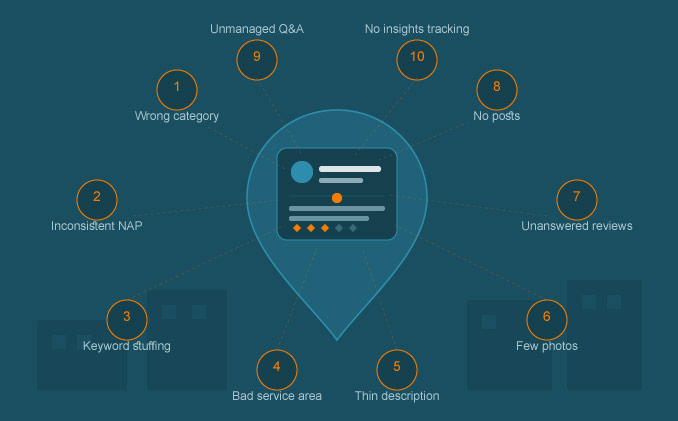
If your business isn’t showing up in the Google Maps 3-pack, the problem usually isn’t bad luck. It’s almost always a handful of Google Business Profile mistakes quietly working against you in the background.
Google Business Profile (GBP) is the single most powerful free local SEO asset a service business owns. It’s also the most commonly mismanaged. Most owners set it up once, fill in the basics, and never touch it again – while Google’s local algorithm keeps evaluating relevance, distance, and prominence every single day.
Below are the 10 most damaging Google Business Profile mistakes we see across service businesses, multi-location brands, and e-commerce storefronts, along with what to fix instead.
1. Choosing the Wrong Primary Category
Your primary category is the single biggest ranking signal on your entire profile. Many businesses pick a category that’s close enough rather than the one Google actually associates with their core service.
A “Plumber” choosing “General Contractor” as their primary category will struggle to rank for plumbing searches, no matter how good their reviews are. The primary category tells Google exactly which search queries your profile is eligible to appear in.
Fix it: Search Google for your main service plus your city, study which categories the top 3-pack results use, and match your primary category to the one with the highest relevance to your core offering. Secondary categories can broaden reach, but the primary category carries the most weight.
2. Inconsistent Business Name, Address, and Phone (NAP)
Citation inconsistency is one of the oldest local SEO problems, and it’s still costing businesses rankings in 2026. If your business name appears as “Smith Plumbing LLC” on your website, “Smith Plumbing Inc.” on Yelp, and “Smith Plumbing Co.” on your GBP, Google has to work harder to confirm these all represent the same entity.
Fix it: Standardize your exact NAP format across your website, GBP, and every directory listing (Yelp, BBB, industry directories). Even small punctuation differences add friction to Google’s entity matching.
3. Stuffing Keywords Into the Business Name
Adding “Smith Plumbing – Best Emergency Plumber Atlanta” to your GBP name field might look like a fast hack, but it violates Google’s guidelines and is one of the most common Google Business Profile mistakes that triggers a suspension or demotion.
Fix it: Use only your real, legal business name in the name field. If you want keyword relevance, build it into your business description, services list, and posts instead – places where Google actually expects descriptive language.
4. Leaving the Service Area Undefined or Too Broad
Service-area businesses often either skip defining their service area entirely or set it far too wide, covering an entire state when they realistically only serve a 30-mile radius. Both choices dilute relevance signals and confuse Google about where you should actually rank.
Fix it: Define your service area using actual cities or zip codes you serve, not arbitrary mile radii. Keep the area tight enough that it reflects where your real customers and reviews come from. Map-pack rankings are strongly tied to proximity, so an overly broad area rarely helps and often hurts.
5. Ignoring the Business Description and Services Section
The business description and services list are prime real estate for relevance signals, yet most profiles leave them generic, half-filled, or copied directly from a template.
Fix it: Write a unique description that naturally mentions your core services and the areas you serve. Fill out the services section completely, with a short description for each service rather than just a title. This is one of the few places where the structure of your content directly maps to how AI-driven search and AI Overviews extract local business information, which matters more every quarter as AI Overviews expand into local queries.
6. Treating Photos as an Afterthought
Profiles with few or outdated photos send a weak engagement and trust signal. Worse, many businesses upload stock photos instead of real images of their team, vehicles, completed work, or storefront – something both customers and Google can detect.
Fix it: Upload real, recent photos consistently: completed jobs, your team at work, your storefront or vehicles, and customer interactions where appropriate. Add new photos at least monthly. Profiles with regularly updated photos tend to show stronger engagement metrics, which factors into Google’s prominence signal.
7. Letting Reviews Pile Up Unanswered
Review velocity, review content, and review responses are all ranking factors, not just trust signals. A profile with 40 unanswered reviews – good or bad – tells Google (and customers) that nobody is actively managing the business’s online presence.
Fix it: Respond to every review, positive and negative, within a few days. Mention the service and location naturally in your responses (“Thanks for trusting us with your water heater repair in Marietta”) since this reinforces relevance. Set up a simple system to request reviews from every completed job to keep review velocity steady rather than sporadic.
8. Never Posting Updates
The Posts feature on Google Business Profile is one of the most underused tools in local SEO. Most businesses either never use it or post once and forget it exists.
Fix it: Publish a short update at least every couple of weeks – a completed project, a seasonal offer, a new service. Active profiles signal ongoing business activity, and posts also occupy more visual space in the knowledge panel, increasing click-through from searchers who do find you.
9. Skipping Q&A Management
The Questions and Answers section is publicly editable, which means competitors or anyone else can post questions and answers on your profile. Left unmonitored, this section can end up with outdated, incorrect, or even misleading information sitting at the top of your profile.
Fix it: Check Q&A regularly. Seed it yourself with the questions customers actually ask (“Do you offer same-day service?”, “Do you serve [neighborhood]?”) and answer them clearly. This also gives you another natural place to reinforce service and location relevance.
10. Not Tracking Performance or Insights
Many business owners set up their GBP and never look at the performance data again, missing clear signals about what’s working and what’s not – which search terms are driving views, how many calls or direction requests are coming through, and how visibility trends over time.
Fix it: Review your GBP Insights monthly. Watch for drops in views or actions that might indicate a suspension flag, a negative review cluster, or a competitor outranking you. Pair this with rank tracking for your priority keywords so you can catch problems before they compound.
How These Mistakes Compound
None of these Google Business Profile mistakes exist in isolation. A wrong primary category combined with inconsistent NAP and zero review responses doesn’t just cost you three separate ranking factors – it compounds, because Google’s local algorithm weighs relevance, distance, and prominence together. Fixing one issue without addressing the others rarely moves the needle on its own.
This is why isolated GBP “tweaks” tend to produce disappointing results. A profile audit needs to look at category selection, NAP consistency, content completeness, review management, and engagement signals as one connected system, not a checklist to clear once and forget.
Frequently Asked Questions
How often should I update my Google Business Profile?
At minimum, add new photos and a post every two to four weeks, and respond to reviews within a few days of receiving them. Profiles that show consistent activity tend to outperform static ones.
Can a wrong category really affect my rankings?
Yes. Your primary category is one of the strongest relevance signals Google uses to decide which search queries your profile is eligible to rank for. An incorrect category can keep you invisible for your most important searches regardless of reviews or distance.
Will fixing these mistakes guarantee a top 3-pack ranking?
No single fix guarantees a top ranking, since local rankings depend on relevance, distance, and prominence working together, plus competitive pressure in your market. Correcting these mistakes removes the obstacles holding you back and puts your profile in a position to compete on a level playing field.
How long does it take to see ranking improvements after fixing a GBP issue?
Most businesses see initial movement within two to six weeks, though full recovery from issues like NAP inconsistency or a wrong category can take a few months as Google re-evaluates your profile’s signals.
Final Thoughts
Google Business Profile mistakes are rarely dramatic. They’re small, accumulated gaps – a wrong category here, an unanswered review there, a description nobody bothered to write – and together they quietly cap how high a business can rank, no matter how good the service actually is.
If you’ve gone through this list and recognized a few of these issues on your own profile, the next step is a structured audit rather than a guess-and-check fix. A proper local SEO strategy treats your Google Business Profile as one part of a larger, compounding search ecosystem – one that includes your website, citations, and review pipeline working together.
If you’d like a professional audit of your Google Business Profile and a clear roadmap to fix what’s holding your rankings back, explore our Local SEO services to see how we approach it.
Written by M Zahidul Islam — Local SEO Specialist and AI Visibility Expert. Helping service businesses and multi-location brands build resilient local search ecosystems. Visit webyonder.com/local-seo/ for a full overview of our Local SEO services.